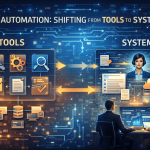

Automating research summaries with AI and Google Docs removes repetitive work from the research process while preserving structure and clarity. Reading source materials, extracting key points, structuring notes, and rewriting them into concise summaries consumes time that could be spent on analysis or decision-making.
AI changes this process fundamentally. Instead of manually producing summaries, you can design a system that transforms research inputs into structured, readable summaries in Google Docs with minimal human effort.
This guide walks through a step-by-step workflow for automating research summaries using AI and Google Docs, focusing on reliability, clarity, and scalability rather than clever hacks.
What This Workflow Solves
Before building anything, it is important to clarify the problem.
Manual research summaries typically involve:
- Copying content from articles, PDFs, or reports
- Highlighting relevant sections
- Rewriting content into consistent formats
- Storing summaries across scattered documents
Automation helps when:
- Research volume is high
- Structure matters more than creative writing
- Consistency is required across summaries
- The same types of sources appear repeatedly
The goal is not to eliminate thinking, but to eliminate repetition.
Overview of the Automated Workflow
At a high level, the workflow looks like this:
- Research input is collected
- AI processes the input and generates a structured summary
- The summary is inserted into a Google Docs template
- The document is stored, organized, and ready for review
When combined into a single system, these steps form end-to-end AI workflows rather than isolated automations.
Each step can be automated independently, but the value comes from designing the full pipeline.
Step 1: Define the Summary Structure First
Automation fails when the structure is unclear.
Before using AI, define what a “good summary” looks like. For example:
- Title
- Key findings (bullet points)
- Methodology or source context
- Implications or takeaways
- Open questions
This structure becomes the prompt foundation. AI performs best when it knows exactly what to produce.
Create a reusable summary template in Google Docs with headings for each section.
Step 2: Collect Research Inputs Consistently
AI summaries are only as good as their inputs.
Decide how research enters the system:
- URLs
- PDFs
- Plain text
- Notes or transcripts
Consistency matters more than format flexibility. If possible, standardize input text before sending it to the AI.
This step is often handled through:
- A research inbox
- A form
- A folder-based system
- A note-taking tool that feeds into automation
The key is reducing variation.
Step 3: Use AI to Generate Structured Summaries
At this stage, AI becomes the transformation engine.
Instead of asking for “a summary,” instruct AI to:
- Extract key points
- Follow the predefined structure
- Preserve factual accuracy
- Avoid interpretation unless requested
For example, prompts should:
- Specify output sections
- Define tone (neutral, analytical)
- Limit speculation
- Avoid unnecessary verbosity
This ensures summaries remain usable and comparable across documents.
Step 4: Connect AI Output to Google Docs
Once the AI generates structured content, the next step is inserting it into Google Docs.
This can be done by:
- Appending content to an existing document
- Creating a new document from a template
- Filling predefined sections programmatically
The important principle is the separation of logic and presentation:
- AI generates content
- Google Docs handles formatting, collaboration, and version history
This keeps the workflow flexible and easy to modify later.
Step 5: Apply Naming and Organization Rules
Automated content quickly becomes messy without organization.
Define rules such as:
- Document naming conventions
- Folder structures by topic, date, or project
- Consistent metadata (tags, headers, source links)
AI can assist here by:
- Generating titles
- Suggesting categories
- Extracting keywords
But the rules themselves should be stable and predictable.
Step 6: Add a Human Review Layer (Optional but Recommended)
Automation does not mean removing oversight.
A lightweight review step ensures:
- Accuracy
- Relevance
- Alignment with project goals
This can be as simple as:
- A checklist
- A review status field
- A final approval comment
The key is keeping review optional and fast, not turning it into another manual bottleneck.
Step 7: Extend the Workflow Over Time
Once the core system works, you can extend it gradually.
Common extensions include:
- Automatic comparison between summaries
- Highlighting contradictions across sources
- Updating summaries when new data appears
- Linking summaries to decision documents
Each extension should reduce effort, not add complexity.
Common Mistakes to Avoid
- Over-optimizing prompts too early
Start simple and refine based on real output. - Automating without structure
Unstructured summaries are difficult to reuse. - Skipping organization rules
Automation without organization creates noise. - Removing humans entirely
Review remains essential for quality control.
Why Google Docs Works Well for This
Google Docs is often underestimated as an automation destination.
Its strengths include:
- Real-time collaboration
- Version history
- Comments and suggestions
- Easy sharing and permissions
By combining AI with Google Docs, you get automation without sacrificing visibility or control.
When This Workflow Makes the Most Sense
This approach works best when:
- Research summaries are frequent
- Consistency matters
- Outputs are shared across teams
- Speed is more important than stylistic nuance
It is especially effective for:
- Analysts
- Researchers
- Consultants
- Content strategists
- Knowledge workers handling large volumes of information
Final Thoughts
Automating research summaries is not about replacing understanding. It is about protecting attention.
By designing a clear structure, using AI as a transformation layer, and relying on Google Docs for collaboration and organization, you create a system that scales without becoming fragile.
The result is not faster summaries, but better use of cognitive effort — where humans focus on interpretation and decisions, not transcription and formatting.
That is the real value of automation in knowledge work.